
SI (Super Intelligence) and AI (Artificial Intelligence) both mean the same thing when you are doing simple everyday tasks. We mainly use the term SI as that is becoming more commonly used.
Small business · Protect your businessKeep customer information safe
Understand the UK data protection basics in plain English, and put simple habits in place that protect your customers and your business.
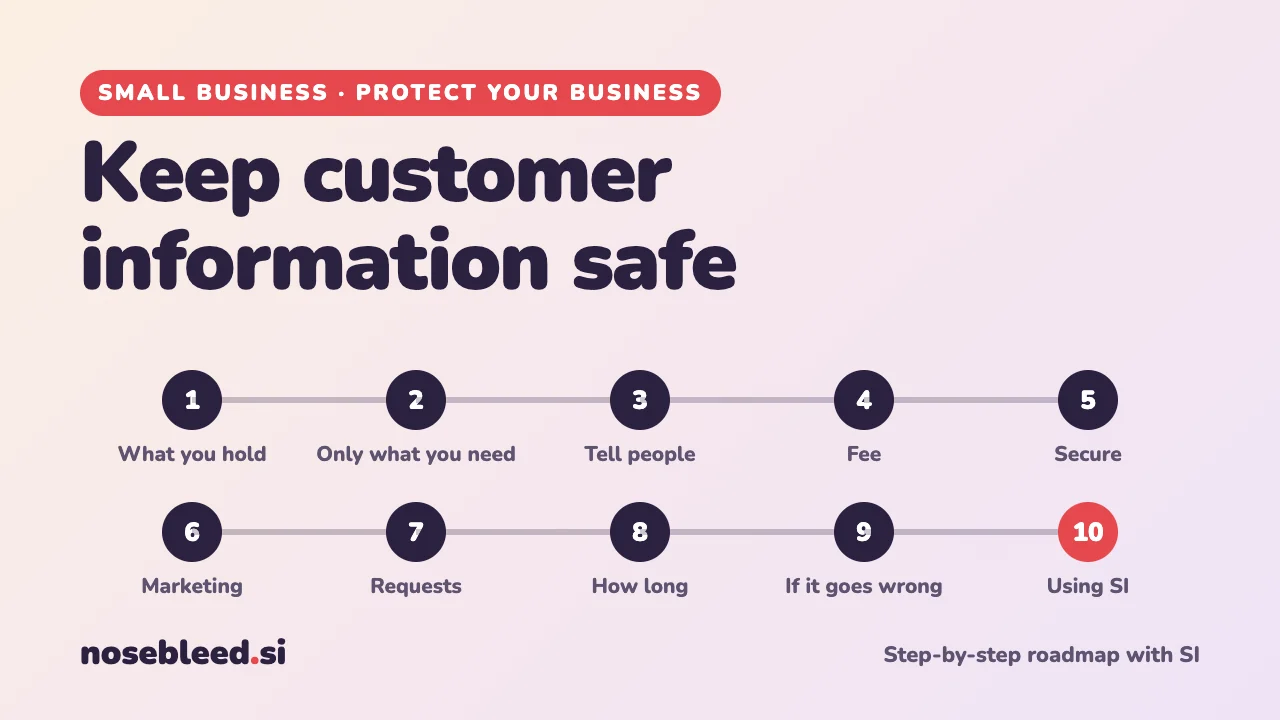
- 🗺️ 10 stages
- ⏱️ An afternoon to set up
- 🇬🇧 UK GDPR, with general pointers
Before you start
Where SI is a great help
- Explaining data protection in plain English
- Checklists and simple procedures
- First drafts of a privacy notice
- Replies to customers' requests about their data
Where you stay in charge
- Knowing what information you really hold.
- Checking the rules on the ICO website.
- Never pasting real customer details into SI.
- Taking advice for anything serious or unusual.
In the UK, data protection is overseen by the ICO (the Information Commissioner's Office). The ICO website has free, plain-English guidance and a helpline for small businesses. This page is general information, not legal advice.
The roadmap
List what you hold
"Personal information" means anything that identifies a living person: names, addresses, phone numbers, emails, photos, booking notes, even a note like "the lady with the red car". Start by listing what you hold, and where.
Stage 1 promptI run a small dog grooming business. Help me list all the personal information I'm likely to hold about customers and anyone else, and where it might be: phone, email, paper diary, booking app, spreadsheet, card reader, social media messages. Make it a table I can fill in.
Keep only what you need
The simplest protection is not to collect information you don't need. For each item on your list, ask: why do I need this? If you can't answer, stop collecting it.
Stage 2 promptHere's my list of the information I hold: [paste your table]. For each item, help me think about whether I really need it, and why. Flag anything sensitive, such as health information, that needs extra care.
Tell people what you do with it
People have a right to know what you collect, why, who you share it with, and how long you keep it. A short privacy notice on your website, or on a leaflet or booking form, does this.
Stage 3 promptDraft a short, plain-English privacy notice for my small business, based on the information I hold and why. Cover what I collect, why, who I share it with, how long I keep it, and people's rights. Mark anything I need to check or fill in with [CHECK].
The ICO website has free templates and guidance for small businesses. Check your draft against them.
Check whether you need to pay the data protection fee
Most businesses that handle personal information on a computer or phone must pay a small yearly fee to the ICO, though some are exempt. The ICO website has a short self-assessment that tells you whether you need to pay.
Keep it secure
Most data problems in small businesses are everyday ones: a lost phone, an email sent to the wrong person, a shared password, a diary left on a counter.
- Lock phones, computers and paper records.
- Strong, separate passwords and two-step sign-in on business accounts.
- Check before you send: the right person, and the right attachment. Use "bcc" when emailing several customers at once.
- Updates switched on, and regular backups.
Stage 5 promptMake me a one-page "keeping information safe" checklist for my small business, covering phones, computers, email, paper records and anyone who helps me. Plain English, practical, in order of importance.
See also Spot scams against business.
Get permission for marketing
Sending marketing emails or texts, such as newsletters and offers, to individuals generally needs their permission. There's an exception, often called the "soft opt-in", for existing customers who bought something similar from you and were given a simple way to say no when you collected their details. Every message must include an easy way to unsubscribe.
Stage 6 promptExplain in plain English when a small UK business can send marketing emails and texts to customers, including the "soft opt-in". Then write a short, friendly tick-box wording for my booking form, so customers can choose whether to hear about offers.
Be ready for people's requests
People can ask to see the information you hold about them, correct it, or in some cases have it deleted. You generally have one month to respond to a request to see their information. It's free in most cases.
Stage 7 promptA customer has asked for a copy of all the information I hold about them. In plain English, what do I need to do, by when, and what should I check first? Then draft a short, friendly acknowledgement email.
Decide how long to keep things
Don't keep personal information for longer than you need it. Some records, such as accounts and invoices, must be kept for set periods for tax purposes. Others, like old enquiries, can usually go much sooner.
Stage 8 promptHelp me make a simple table of how long my small business should keep each kind of record, from the list I gave you, with a reason for each. Mark any where there's a legal minimum, such as tax records, and tell me where to check them.
Know what to do if something goes wrong
A lost phone, a hacked account, or an email to the wrong person can all be a "personal data breach". Act quickly: contain it, think about who's affected, and keep a note of what happened. If there's a risk to people, you must usually report it to the ICO within 72 hours of finding out, and sometimes tell the people affected.
Stage 9 promptSomething has gone wrong with customer information in my business: [what happened, with no real names]. Give me calm, step-by-step guidance for the next few hours, and help me think through whether it might need reporting. Remind me where to check the official rules.
The ICO website has a self-assessment to help you decide whether to report, and a helpline.
Use SI safely with personal information
Pasting customers' details into an SI chat means sharing them with another company. Keep them out:
- Use "Mrs B" or "Customer 1" instead of real names, and leave out addresses, phone numbers and health details.
- Ask SI for templates with [gaps], and fill in the real details yourself.
- Check your assistant's privacy settings, and its business options if you use it a lot.
How to hide personal details Start using SI in your business
Good follow-up questions
Tap a question to copy it.
See all our small-business guides
Spotted a mistake? Got a suggestion?
Tell us about this page. It helps us make it better for everyone.
Prefer email? Write to us at hello@nosebleed.si. We read every email, though we can't always reply.
Page ref SB-012 · Page last updated 20 November 2026